Eos Rebel T8I 850D Honest Review — Is the Hype Justified?
Introduction
I've been using the Canon Eos Rebel T8I (also sold as the 850D) as my primary camera for the past six months. I bought it because I wanted a reliable, easy-to-use DSLR that could handle travel, family photos, and a little bit of video work without breaking the bank. Over those months I carried it on hikes, family gatherings, and short trips, and I put it through a mix of portraits, landscapes, low-light indoor shots, and video vlogs. What I found was a camera that excels in familiar Canon ways — color, ergonomics, and ease of use — but that also carries compromises that matter for certain users, especially those focused on 4K video or demanding autofocus in live view.
What I tested and how I used it
My typical setup was the T8I body with the kit 18–55mm IS STM lens for everyday use and a Canon 50mm f/1.8 STM for portraits. I tested both stills and video, shot in RAW and JPEG, and experimented with Canon's autofocus modes (including face and eye detection). I paired it with my phone over Bluetooth for quick transfers and used the vari-angle touchscreen extensively for low-angle landscape work and awkward portrait compositions. I also tested battery life in real-world sessions, often shooting both photos and short video clips over the course of a day.
Design, build and handling
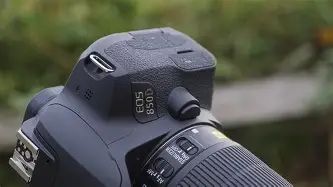
On day one I noticed how familiar the T8I feels in hand — Canon's ergonomics are predictable in the best way. The grip is comfortable for my medium-sized hands, and the buttons fall naturally under my fingers. The body is mostly polycarbonate, so it's not indestructible, but it feels solid enough for daily use. I liked the textured finish on the grip, which prevented slips during long shoots.
The vari-angle touchscreen is a highlight in my experience. It's responsive and makes composing at high and low angles painless. I used it frequently for composing video and for live view stills, and I appreciated the ability to tap-to-focus. The optical viewfinder is bright and accurate for composing stills — traditional DSLR users will be right at home here.
Image quality and sensor performance
The T8I uses a 24-megapixel APS-C sensor, and in practice that produces sharp, usable files for prints and web. I noticed Canon's color science immediately: skin tones render nicely straight out of camera, and the JPEGs often required only light adjustments. When I shot RAW, I had enough latitude to recover highlights and shadows on most scenes without obvious banding or color shifts.
Low-light performance is solid for the class. In my indoor evening shoots, ISO 1600–3200 yielded files that were perfectly usable for social sharing and 8x10 prints after modest noise reduction. ISO 6400 and above started to show noticeable noise and softening, which is to be expected for an APS-C sensor and the camera's intended market. For me, the practical sweet spot was ISO 100–3200; I avoided pushing past that unless absolutely necessary.
Autofocus and continuous shooting
For stills in the optical viewfinder, the 45-point all cross-type AF system is reliable. I was able to track moving subjects reasonably well when using the viewfinder and single-point or zone AF. Continuous shooting up to around 7 frames per second was useful for casual action photography — I caught kids running and a dog mid-leap with a good success rate. The buffer fills faster than on higher-end bodies, so long burst sessions will taper off quickly unless you use a fast UHS-I card.
In Live View and video, Canon's Dual Pixel CMOS AF is excellent for 1080p shooting: smooth, accurate, and unobtrusive. However, there is a notable caveat in my experience — 4K video uses a different AF method and introduces a crop. When I experimented with 4K clips, autofocus performance degraded and the camera hunted more, which frustrated me during handheld vlogging. If your primary use is 4K video with continuous AF, expect compromises.
Video: strengths and compromises
I used the T8I for occasional vlogging and short travel clips. Shooting 1080p at 60fps gave me usable, clean footage with reliable AF and a nice shallow depth with the 50mm lens. The vari-angle screen helps frame yourself when vlogging and the microphone input is convenient for an external mic.
Find top-rated Electronics products at great prices.
View Offers →That said, the 4K implementation disappointed me. There is a crop factor in 4K that narrows the field of view, and the autofocus behavior in 4K isn't as smooth as Dual Pixel AF in 1080p. For handheld shooters who want clean, wide 4K with rock-solid AF, the T8I is not the ideal choice. If you mostly shoot 1080p or prioritize stills, the T8I's video is perfectly serviceable.
Battery life and connectivity
Battery life in my real-world usage was okay but not outstanding. On a typical day of mixed shooting — a few hundred photos, some Live View, and short video clips — I would get through a day with one battery, but I often reached for a spare for predictable all-day shoots. Live View and Wi‑Fi transfers are the biggest drains, so if you plan to shoot a lot of video or tether to your phone frequently, budget for at least one extra LP‑E17 battery.
Connectivity-wise, pairing with my phone was convenient but not flawless; initial Bluetooth pairing is simple and works for remote shooting and transferring reduced-size images, but large RAW transfers are too slow for practical use. The built-in Wi‑Fi can move larger files, but I found it finicky at times and preferred using a card reader for full-resolution file transfers.
Menus and user experience
Canon's menu system is, in my opinion, one of the more user-friendly ones. I appreciated the quick access to commonly used settings and the clear layout for customizing buttons. The touchscreen simplifies adjusting settings during live view, and the guided modes are genuinely helpful for beginners. As an intermediate shooter, I liked that the camera lets you grow into more advanced features without being overwhelming.
Looking for the best Electronics deals on Amazon?
Browse Now →2. Think about lenses — don’t treat the kit lens as final
The kit 18–55mm lens is a competent starter and I used it extensively, but upgrading to at least one fast prime (for example a 50mm f/1.8) will transform low-light performance and subject separation. Canon's EF and EF‑S lens ecosystem is mature, so plan your system around the lenses you want to own for portraits, landscapes, or telephoto needs.
3. Accessories that mattered to me
- Extra battery — Live View and video drain the battery more than expected; carry a spare.
- Fast SD card — Use a UHS-I card with a good write speed to reduce buffer recovery times; this helped my burst shooting workflow.
- External microphone — If you plan to use the camera for talking-head videos, an external mic improved audio quality significantly.
- Protective case or strap — The camera’s body is not pro-level weather sealing, so protect it from knocks and the elements.
4. Used vs new and warranties
I considered a used body early on and found that gently used T8Is can be an excellent value. If you buy used, check the shutter count, test autofocus points, and verify that the vari-angle screen is functioning correctly. For new bodies, the manufacturer warranty and the peace of mind are worth the premium for many buyers.
5. Budget for a complete system
Remember that the camera body is just one part of a system. Budget for at least one additional lens and a spare battery if you want to be ready for varied shooting situations. Lenses often determine the character and capability of your photography more than the camera body.
Final verdict — is the hype justified?
After months with the T8I, I think the hype around it is mostly justified for its intended audience. In my experience, the camera delivers excellent still-image quality, comfortable handling, and very usable 1080p video performance. It felt like an honest, practical tool that helped me take better photos than my phone and learn more about photography without steep complexity.
However, the T8I is not a miracle device. The compromises in 4K video autofocus and the lack of some pro-level features like a headphone jack mean it won't satisfy every hybrid shooter or aspiring filmmaker. For photographers who prioritize color, ergonomics, and a familiar Canon workflow, this camera remains a strong contender. For those whose main goal is cutting-edge 4K video with flawless live AF, a mirrorless alternative might be a better match.
In short: if you want a reliable DSLR that makes great photos and very good 1080p video while keeping things straightforward, the T8I served me well. If your needs skew heavily toward advanced 4K video or pro-level ruggedness, temper your expectations or look elsewhere.
Conclusion
I've enjoyed using the Eos Rebel T8I / 850D. It helped me raise the quality of my everyday photography and forced me to think more critically about lenses and composition. I appreciated the tactile controls, the friendly menu system, and the natural-looking images it produced. My disappointments — mainly the 4K limitations and lack of a headphone jack — are real but situational. For a lot of people buying their first serious camera or stepping up from a compact or smartphone, the T8I delivers a lot of value and a welcoming learning curve. After living with it for months, I feel comfortable saying it's a dependable, camera-first tool that rewards photographers more than it frustrates them.