I Switched to the Nest Mini and Here is What Happened
Category: Audio
Introduction
When the decision came to replace a primary smart speaker, the author chose the Nest Mini. The move was less about a dramatic upgrade and more about simplifying daily routines, tightening integration with existing devices, and testing how a compact speaker performs in real-world rooms. This article documents that experience in an objective, third-person editorial voice: what worked, what disappointed, and what potential buyers should weigh before choosing the Nest Mini.
The Nest Mini occupies a popular niche: a low-cost, compact smart speaker that promises reliable voice assistance and adequate sound for background listening. For many buyers, the practical questions are simple: does it fill the room with sound, will it understand voices across distances and noise, how well does it play with other smart devices, and is privacy handled responsibly? The following sections break down those concerns with specific observations and use-case guidance.
Product Overview
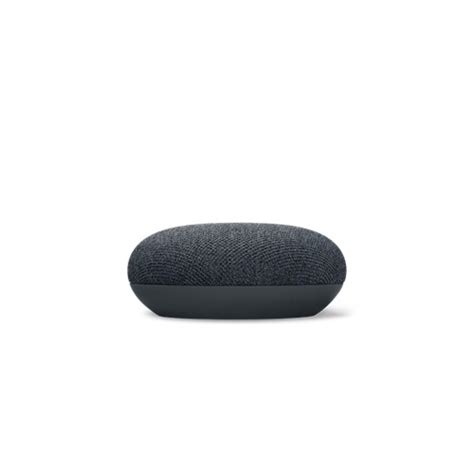
The Nest Mini is Google’s compact, wall-mountable smart speaker. It is designed primarily for voice-activated tasks—timers, alarms, quick answers from the web, and controlling smart home devices—while also functioning as a speaker for music, podcasts, and radio streams. The physical footprint is small, the top surface is fabric-covered, and touch controls are present for basic playback and volume adjustments. Unlike some portable speakers, the Nest Mini requires constant power from a wall outlet and is intended as a stationary home device.
Detailed Review and Analysis
Design and Build Quality
The Nest Mini's design favors subtlety over flash. The fabric mesh top and compact circular form make it easy to tuck into a corner, place on a shelf, or mount on a wall. The second-generation Nest Mini improved bass performance compared to the original, and it includes a small screw-mount slot on the back so users can hang it like a picture—an often overlooked convenience for kitchen or bathroom placement.
Build quality is solid for its price point: the plastic body feels durable, and the fabric avoids easily showing dust. The touch controls are responsive, but they are intentionally minimal—tapping the sides adjusts volume, tapping the top pauses or resumes playback, and holding the mic mute switch disables voice recognition.
Sound Quality
Sound is the aspect where expectations should be calibrated. The Nest Mini delivers appreciably improved low-end compared to its predecessor and better clarity at conversational volumes. For intimate listening—podcasts, news, background playlists in the kitchen or bedroom—it performs well. However, in larger rooms or when the listener wants immersive, bass-heavy music at higher volumes, the Nest Mini shows its limits: distortion appears at the top of the volume range, and the small driver cannot match the depth of larger speakers.
Equalization options are available through the Google Home app; users can tweak bass and treble to suit their tastes. In practice, modest adjustments help, but they cannot overcome the physical constraints of a compact driver.
Discover deals on Audio & Headphones — updated daily.
See Deals →Voice Assistant and Smart Home Integration
Google Assistant remains one of the Nest Mini's strongest points. Voice recognition is reliable in close proximity and adequate at moderate distances, even with background kitchen noise. Assistant delivers quick answers to queries, handles timers and reminders smoothly, and integrates deeply with Google's services—calendar lookups, personal commute updates, and contextual follow-ups are seamless if the user is in Google’s ecosystem.
Smart home control is similarly straightforward. The Nest Mini can control lights, thermostats, plugs, and switches compatible with Google Assistant. Creating routines and automations via the Google Home app is intuitive, and multi-room audio setup is available for synchronizing playback across multiple Google/Nest speakers or Chromecast-enabled devices.
Setup, Software, and Connectivity
Setup is fast for anyone already using the Google Home app: the device appears automatically when powered, and on-screen prompts guide Wi‑Fi connection and account linking. The Nest Mini supports 2.4 GHz and 5 GHz networks and can be assigned to rooms for group controls.
Bluetooth is available for basic casting from phones, but the unit is primarily designed for Wi‑Fi streaming via Chromecast built-in and direct service connecti…
Privacy and Controls
For privacy-conscious users, the Nest Mini includes a dedicated microphone mute switch that physically disables voice detection. The Google Home app also provides activity controls where past voice interactions can be reviewed and deleted. However, buyers who want a voice assistant that never connects to a cloud service will find the Nest Mini unsuitable; its core value is its cloud-connected intelligence.
Real-World Use Cases
Everyday usage scenarios reveal the Nest Mini’s strengths and limitations:
- Kitchen companion: The Nest Mini excels as a kitchen assistant—setting timers, converting measurements, reading recipes aloud, and providing hands-free music while cooking.
- Bedroom helper: It functions well as a bedside alarm and sleep sounds player. Its small size makes it unobtrusive on a nightstand, though those wanting richer sleep-sound bass might prefer a larger speaker or sleep-focused device.
- Home office: For voice searches, hands-free calls, or background music, it is a convenient addition. The microphones are good at picking up voice queries from across a small home office space.
- Multi-room audio: In a house with several Nest or Chromecast speakers, the Nest Mini integrates smoothly into multi-room setups. It works best as part of a distributed system rather than a standalone primary audio source.
- Accessibility: Voice control can be a meaningful accessibility enhancement for users with mobility constraints, enabling control over lights, locks, and media without needing to reach physical devices.
Pros & Cons
Pros
- Compact, unobtrusive design that fits into most rooms
- Improved bass and clearer sound compared to previous generation
- Strong Google Assistant integration and smart home control
- Fast, easy setup via Google Home app
- Built-in wall-mount option for flexible placement
- Affordable price point for an entry-level smart speaker
- Regular software updates and Chromecast built-in
Cons
- Not suitable as a primary speaker for hi-fi listening or large rooms
- Requires constant power—no battery portability
- Some users may prefer an alternative assistant or ecosystem
- Privacy concerns remain for those uncomfortable with cloud-based voice services
- Limited physical controls beyond touch and mic mute
Comparison: Nest Mini vs Comparable Smart Speakers
The following table compares the Nest Mini with two frequently considered alternatives: the Amazon Echo Dot and the Apple HomePod mini. This high-level comparison focuses on attributes buyers typically care about.
Discover deals on Audio & Headphones — updated daily.
See Deals →| Feature | Nest Mini | Echo Dot (typical) | HomePod mini |
|---|---|---|---|
| Voice Assistant | Google Assistant | Alexa | Siri |
| Sound Quality | Good for voice & background music; modest bass | Comparable for voice; variable bass depending on generation | Strong clarity & surprisingly full sound for size |
| Smart Home Ecosystem | Best with Google-compatible devices and Chromecast | Best with Alexa-compatible devices and Amazon services | Best for HomeKit and Apple services |
| Design & Mounting | Fabric top, built-in wall-mount slot | Fabric/plastic, some models have mounts available | Compact spherical design, no built-in wall-mount |
| Privacy Controls | Mic mute switch; activity controls in app | Mic mute button; Alexa voice history controls | Mic mute; Apple emphasizes on-device processing where possible |
| Multi-Room | Yes (Google Cast) | Yes (Alexa Multi-Room Music) | Yes (AirPlay 2) |
| Bluetooth | Limited for local streaming; primary via Wi‑Fi | Yes (varies by model) | Limited; primarily AirPlay 2 |
| Power | Requires wall power | Requires wall power | Requires wall power |
| Typical Use Case | Everyday assistant & background audio in Google ecosystem | Everyday assistant & smart home control in Amazon ecosystem | Best for Apple users wanting better in-room audio |
Buying Guide: Who Should Consider the Nest Mini?
Choosing the Nest Mini makes sense for particular buyer profiles. The following guidance helps potential buyers evaluate whether it fits their needs.
Consider the Nest Mini if:
- The user is already invested in Google services: Google Assistant integrates tightly with Gmail, Google Calendar, and Google Maps, which creates a smoother experience for users who live inside that ecosystem.
- They want an affordable smart speaker for everyday tasks: For timers, quick info, weather, and simple music listening, the Nest Mini offers strong value.
- Space is limited: Its compact footprint and built-in wall-mount make it ideal for small kitchens, bathrooms, and bedside tables.
- They plan multi-room setups: Small, inexpensive speakers work well when distributed around a home to create synchronized playback or centralized announcements.
Consider alternatives if:
- Superior audio is a priority: A dedicated bookshelf speaker, soundbar, or the HomePod mini will outperform the Nest Mini for music lovers seeking fuller sound.
- They prefer a different assistant or ecosystem: Alexa or Siri may be better choices for users heavily invested in Amazon or Apple services.
- Portability matters: If a battery-powered speaker is needed, the Nest Mini’s plug-only design is a limiting factor.
Practical setup tips
- Place the Nest Mini at ear height for better voice pickup; avoid tucking it in closed cabinets.
- Avoid placing it directly next to stovetops or high-moisture areas—heat and steam shorten electronics’ lifespans.
- Use the Google Home app to assign the device to a room and create groups for multi-room audio.
- Enable Voice Match if multiple household members use personalized features like calendars and commute updates.
- Review privacy settings in the Google account and set up routines that simplify common tasks (e.g., “Good morning” to trigger lights, weather, and news).
Cost, Value, and Longevity
One of the Nest Mini’s biggest appeals is its cost-effectiveness. For a modest investment, users get a capable voice assistant, Chromecast audio support, and a small, attractive speaker. Value increases for those who buy multiple units to enable whole-home features.
Longevity considerations include software support and integration with evolving smart home standards. Google has maintained the Home and Assistant ecosystems through periodic feature updates. However, the physical limitation of the small speaker means that, as listening needs evolve, buyers may eventually want to upgrade to a higher-fidelity device while retaining the Nest Mini for rooms where background audio is sufficient.
Final Thoughts and Conclusion
After switching to the Nest Mini, the author found that the device fulfilled expectations as a helpful, inexpensive, and unobtrusive smart speaker. It excelled at daily voice-first tasks, routine automation, and background listening in small spaces. Its minor but meaningful design touches—like the integrated wall-mount and fabric finish—make placement flexible and visually acceptable in most homes. Where it fell short was unsurprising: it is not a music-first speaker for enthusiasts and will not satisfy listeners who demand more volume and deeper bass.
For most buyers, the decision should hinge on ecosystem preference and use case. Those embedded in Google's ecosystem who want a budget-friendly, easy-to-use smart speaker will find the Nest Mini a practical choice. Those prioritizing sound performance, portability, or a different assistant may want to explore alternatives.
Ultimately, the Nest Mini represents a solid, pragmatic option in the compact smart speaker market: modest in ambition, reliable in daily use, and well suited to rooms and routines that value convenience over audiophile-grade sound.